

- Introduction
- Project health indicators
- New and updated features
- Starlight
- Other Topics
- Related Projects
- Looking ahead to 2026 and Astro v6
Introduction
Happy New Year, Astronauts!
In this article, I will highlight some of the most important aspects of Astro in 2025, focusing on project health indicators, new features, related projects, and notable events that stood out to me. We will look back on Astro’s journey throughout 2025 and also touch briefly on what lies ahead in 2026.
It is a bit of a long read, but whether you are a long-time Astro user or new to Astro, I hope you will find something useful here!
If you are interested, I have also written similar articles for 2023 and 2024, so feel free to check them out as well:
Project health indicators
Release Versions
As of the start of 2025, Astro was at v5.1.2, and by the time of writing this article, near the end of the year, v5.16.6 has been released. Including v6 alpha versions, there were a total of 113 releases in 2025.
For those who are curious about the details of each release, you can check the full list of Astro releases on GitHub.
GitHub Stars
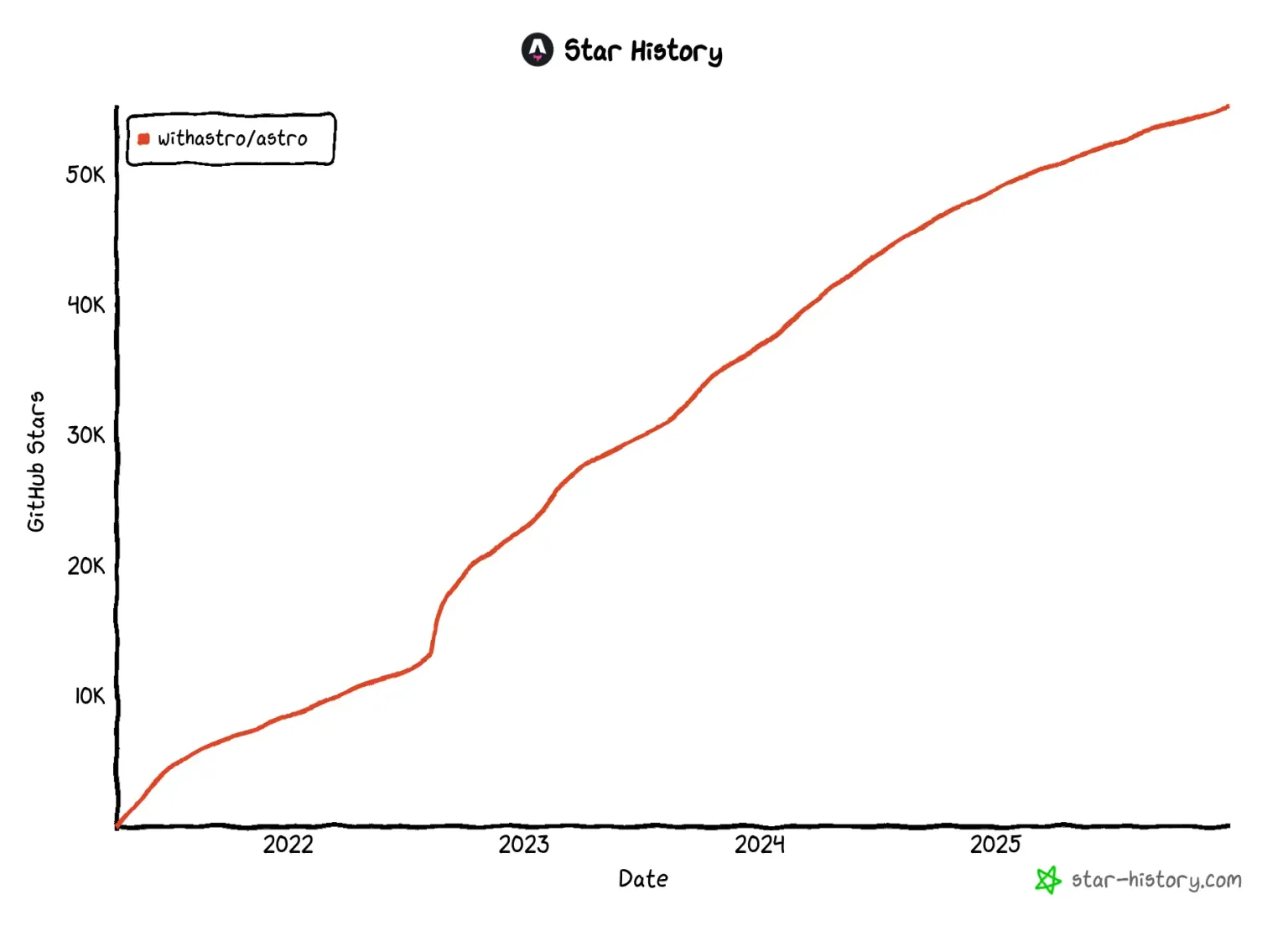
Astro surpassed 50,000 GitHub stars in early 2025 and has now reached approximately 55,200. This represents an increase of nearly 7,000 stars since the beginning of 2025.
While 55,000 stars is already an impressive number, do you know where that places Astro among all repositories on GitHub? At the time of writing this article, only 295 repositories have more than 55,000 stars! Astro is ranked 293rd overall, placing it alongside projects such as FFmpeg and OpenAI Codex. This shows that reaching 55,000 stars is a significant milestone.
Below is a GitHub Star History chart, which shows that Astro has steadily gained stars over the years.
NPM Downloads
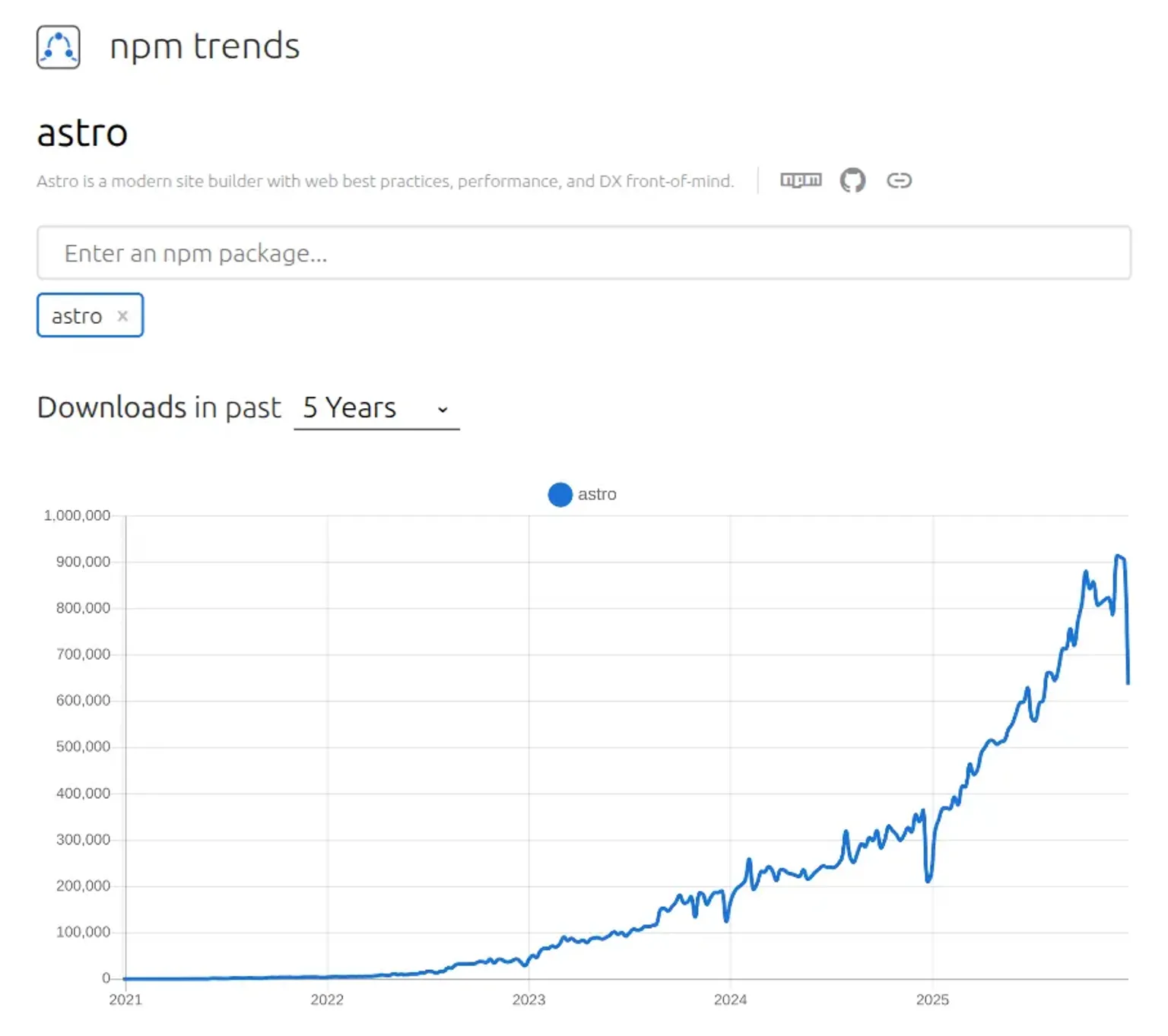
Data from npm trends shows that Astro had approximately 360,000 weekly downloads at the start of 2025, but this number grew to over 900,000 by the end of the year. This is about a 2.5x increase, showing that adoption has been accelerating compared to past years. This suggests that Astro is being adopted across a wide range of project types.
Octoverse 2025
Astro was one of the fastest-growing languages on GitHub in 2025!
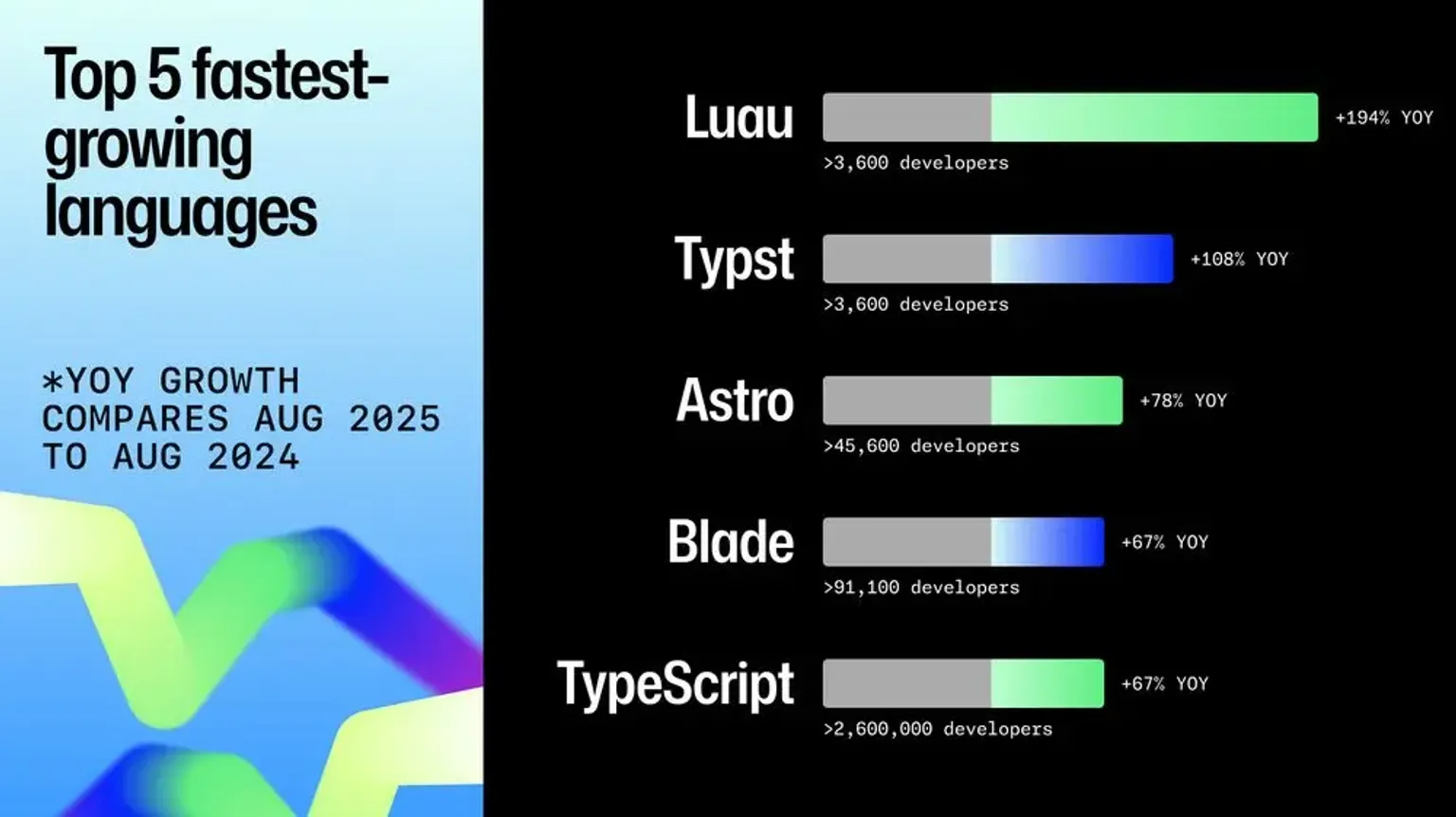
You may be thinking, “Wait, is Astro really a language?” That is a fair question, but if GitHub’s language experts say so, who are we to argue? In any case, it’s exciting to see Astro recognized in this way.
For more details, check out the GitHub Octoverse 2025 website.
Stack Overflow Developer Survey
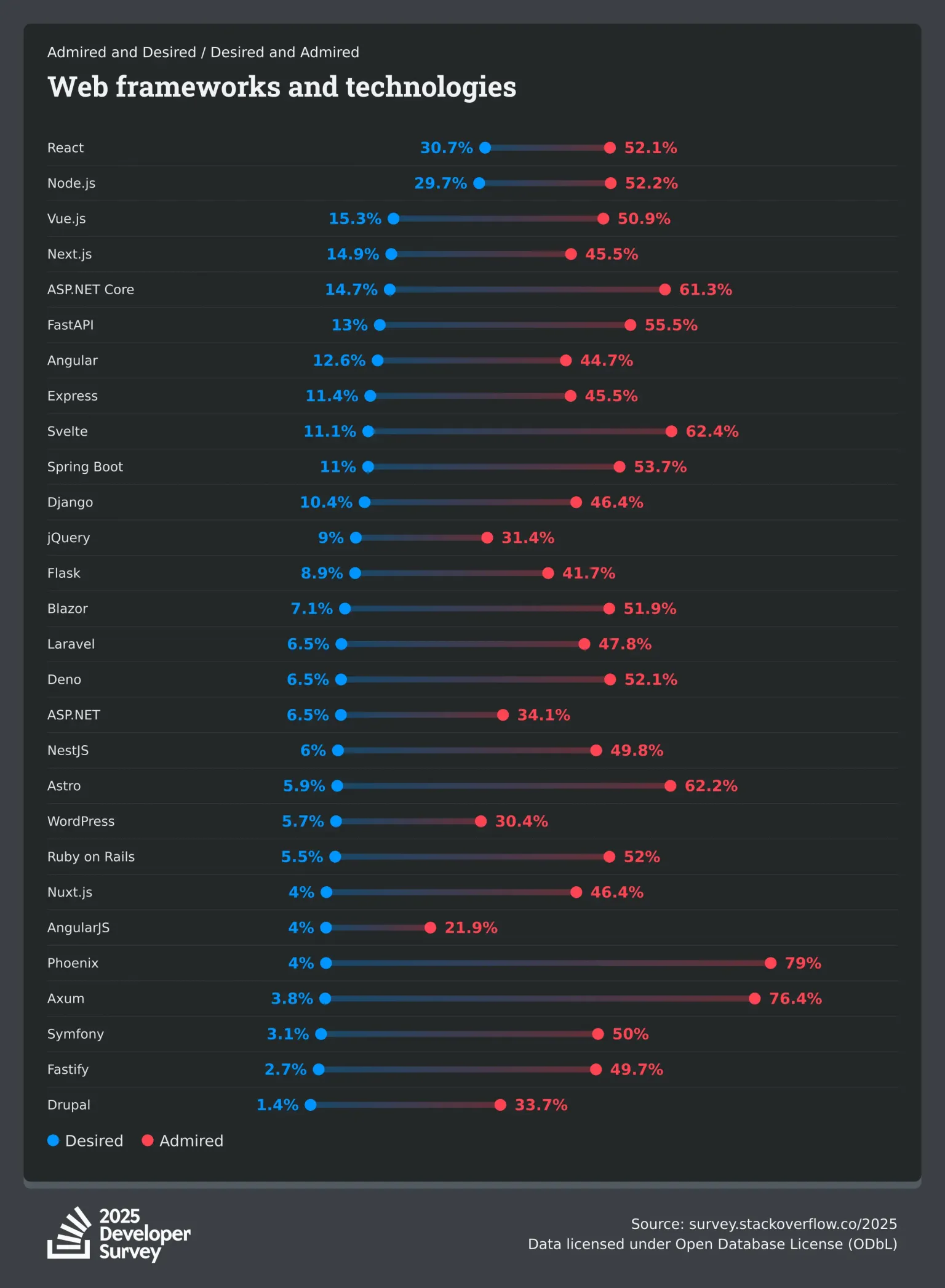
Astro is admired in the 2025 Stack Overflow Developer Survey!
This annual survey provides a snapshot into the needs of the global developer community, focusing on the tools and technologies they use or want to learn more about. Of all web frameworks and technologies, Astro was the 4th most admired at 62.2% of 23,678 respondents.
JavaScript Rising Stars
JavaScript Rising Stars is an annual report that highlights the most popular and fast-growing projects in the JavaScript ecosystem based on the number of new GitHub stars gained over the past year.
In the 2025 JavaScript Rising Stars, Astro ranked 4th in the Back-end/Full-stack category and also placed 3rd in the Static Sites category. Additionally, Starlight ranked 8th in the Static Sites category. Even when compared with other projects, Astro stands out with strong recognition. Be sure to visit the site and check out the details.
It is worth noting that the JavaScript Rising Stars site is built with Astro. The repository is also publicly available, so feel free to take a look if you are interested.
New and Updated Features
2025 saw several new Astro features, many released behind experimental flags in 2025 that will be available by default in the upcoming v6 major release in early 2026.
You can enable the experimental flags mentioned below, or install the latest v6 preview release to try them out!
Live Content Collections
Content collections, introduced in Astro v2.0, have been a powerful feature that allows you to manage and use local content such as Markdown and MDX files in a type-safe manner.
In v5.0, this concept was reimagined with the introduction of the Content Layer API, enabling content fetched from external CMSs and APIs to be handled with the same level of type safety as local Markdown and MDX files. However, because this content is fetched at build time, supporting highly dynamic or personalized content was difficult.
With the experimental introduction of live content collections in v5.10.0, it is now possible to fetch data at runtime instead of build time via content loaders. This allows sites to access the latest data in a type safe way without requiring a rebuild whenever content is updated.
To enable this feature in Astro 5 (available by default in Astro 6), you need to configure on-demand rendering and then add the experimental.liveContentCollections flag to your Astro config file:
{ experimental: { liveContentCollections: true, },}Then, in src/live.config.ts, define your live collections with a loader using the defineLiveCollection() function:
import { defineLiveCollection } from 'astro:content';import { storeLoader } from '@mystore/astro-loader';
const products = defineLiveCollection({  loader: storeLoader({    apiKey: process.env.STORE_API_KEY,    endpoint: 'https://api.mystore.com/v1',  }),});
export const collections = { products };
Once this setup is complete, you can access live data using the getLiveCollection() and getLiveEntry() functions:
---export const prerender = false; // Not needed in 'server' mode
import { getLiveCollection, getLiveEntry } from 'astro:content';
// Get all productsconst { entries: allProducts, error } = await getLiveCollection('products');if (error) {  // Handle error appropriately  console.error(error.message);}
// Get products with a filter (if supported by your loader)const { entries: electronics } = await getLiveCollection('products', { category: 'electronics' });---
Did you notice the similarities with the existing APIs? In short, src/content.config.ts and src/live.config.ts, defineCollection and defineLiveCollection, as well as getCollection/getEntry and getLiveCollection/getLiveEntry, are designed to work in almost the same way. This really highlights the elegance of Astro’s API design.
However, because live content is fetched at runtime, you need to handle unexpected errors and consider performance optimizations like caching. The good news is that Astro provides APIs to help you do exactly that.
Although it was not covered here, you can still use Zod when defining collections and distribute your custom loaders on npm, just as before. For more details, check out the official documentation on experimental live content collections.
If you are interested in learning through video, you may also want to check out the following:
Responsive Images
Images are an essential part of most websites, but displaying them correctly across various devices is far from trivial. Screen size, resolution, and image format are just a few of the factors developers need to consider when rendering images on the screen.
To address these challenges flexibly, in v5.10.0, Astro introduced a new behavior that makes responsive images much easier to implement.
To automatically add global styles for responsive images, set image.responsiveStyles to true in your Astro config file.
{ image: { responsiveStyles: true, },}This allows you to specify a layout value on the <Image /> component to determine how the image should resize when its container changes size.
In the example below, setting the layout property makes the image scale to fit the container while maintaining its aspect ratio, without exceeding the specified dimensions.
---import { Image } from 'astro:assets';import myImage from '../assets/my_image.png';---
<Image  src={myImage}  alt="A description of my image."  layout="constrained"  width={800}  height={600}/>
With the new responsive behavior, the necessary srcset and sizes values are generated automatically, and the appropriate styles for proper resizing are applied. Additionally, a priority property will be added to make it possible to load certain images with higher priority.
This <Image /> component will generate the following HTML output :
<img src="/_astro/my_image.hash3.webp" srcset="/_astro/my_image.hash1.webp 640w, /_astro/my_image.hash2.webp 750w, /_astro/my_image.hash3.webp 800w, /_astro/my_image.hash4.webp 828w, /_astro/my_image.hash5.webp 1080w, /_astro/my_image.hash6.webp 1280w, /_astro/my_image.hash7.webp 1600w" alt="A description of my image" sizes="(min-width: 800px) 800px, 100vw" loading="lazy" decoding="async" fetchpriority="auto" width="800" height="600" style="--fit: cover; --pos: center;" data-astro-image="constrained">The generated markup may look verbose at first glance, but the key points are fairly simple:
- The
srcsetattribute is generated automatically so the browser can choose the most appropriate image size for the current screen. - The
sizesattribute reflects the layout constraints defined by thelayout,width, andheightprops. - Astro applies scoped styles using
data-astro-imageattributes to ensure images resize correctly without requiring manual CSS.
In addition, the following global styles are generated and applied by Astro to ensure that your images resize correctly:
:where([data-astro-image]) { object-fit: var(--fit); object-position: var(--pos);}:where([data-astro-image='full-width']) { width: 100%;}:where([data-astro-image='constrained']) { max-width: 100%;}It is also worth noting that Astro v5.7.0 introduced support for importing SVG files as Astro components. This is another handy feature, so be sure to give it a try!
---import Logo from './path/to/svg/file.svg';---
<Logo width={64} height={64} fill="currentColor" />
Check out the official docs to learn more about responsive images in Astro.
If you are interested in learning through video, you may also want to check out the following:
Fonts
Fonts are also a crucial part of websites, but loading them efficiently can be just as challenging as images. Choosing the right loading strategy, defining fallbacks, and adding preload hints all require careful configuration.
Astro previously did not provide a built-in approach for working with fonts, but v5.7.0 introduced an experimental Fonts API. With this API, Astro can handle web font optimizations such as preload links, optimized fallbacks, and opinionated defaults.
To enable this feature in Astro v5 (available by default in v6), configure experimental.fonts with at least one font object:
import { defineConfig, fontProviders } from "astro/config";
export default defineConfig({  experimental: {    fonts: [{      provider: fontProviders.google(),      name: "Roboto",      cssVariable: "--font-roboto"    }]  }});
Then, add the <Font /> component and site-wide styling in your <head>:
---import { Font } from 'astro:assets';---
<Font cssVariable="--font-roboto" preload />
<style>body {  font-family: var(--font-roboto);}</style>
With this setup, CSS @font-face rules and font preload tags are automatically generated for you.
The Fonts API also supports providers beyond Google, allows detailed control over the downloaded font files, and even makes it possible to build your own font provider. Be sure to give the new API a try!
Check out the official docs to learn more about the experimental Fonts API.
Sessions
Astro v5.7.0 introduced the Sessions API as a stable feature. This makes it possible to store data on the server side across multiple requests from the same user, allowing you to handle user data, shopping carts, and other stateful information without worrying about data size limits.
Session data can be accessed from Astro components, pages, API endpoints, actions, and middleware. When accessing session data from Astro components or pages, you use Astro.session, while in other contexts you use context.session. In either case, the session object behaves identically. The example below demonstrates how to read cart data from the session in an Astro component:
---export const prerender = false; // Not needed with 'server' outputconst cart = await Astro.session?.get('cart');---
<a href="/checkout">🛒 {cart?.length ?? 0} items</a>
For many use cases, session.get() and session.set() are all you need. That said, the Sessions API also includes session.regenerate() and session.destroy() to handle session ID regeneration and cleanup, along with session.load() for loading a session by ID. When running on Node, Cloudflare, or Netlify, the adapter automatically configures a storage driver for session handling. In other environments, sessions can still be used by specifying a driver manually.
Check out the official docs to learn more about the Sessions API.
Content Security Policy
Content Security Policy (CSP) is an important security layer that helps protect websites from cross-site scripting (XSS) and other code injection attacks.
While CSP is typically implemented using nonce headers that require server-side generation for each request, Astro v5.9.0 introduced experimental support for a hash-based approach using <meta> tags. This solution works seamlessly across all rendering modes (static pages, server-rendered pages, and SPAs) without the complexity of server-side nonce management.
When CSP is enabled, Astro automatically generates a <meta> element containing hashes for all scripts and styles used on the page, including those loaded dynamically. To enable this feature in Astro 5 (available by default in v6), add the experimental.csp option to your Astro config file:
{ experimental: { csp: true, }}You can also pass an object to configure additional options such as algorithm to specify the hash algorithm, directives to apply custom CSP directives, and scriptDirective/styleDirective to specify allowed sources or provide additional hashes for external resources.
For more advanced use cases, Astro provides runtime APIs through the Astro.csp object, allowing you to add directives or hashes on a per-page basis. You can use methods like csp.insertDirective(), csp.insertStyleHash(), and csp.insertScriptHash() to customize the CSP for individual pages.
It is worth noting that inline scripts require custom hashes to be provided, and the <ClientRouter /> component is not compatible with this feature. Be sure to test your CSP configuration using astro build and astro preview, as CSP is not enforced in development mode.
Check out the official docs to learn more about experimental Content Security Policy in Astro.
If you are interested in learning through video, you may also want to check out the following:
Astro Docs MCP Server
While 2025 has been widely described as the year of vibe coding, Astro has been steadily moving forward with support for AI tools as well. The Astro docs now include a new “Build with AI” page, which offers tips for developing Astro projects with AI. The star of the show is the Astro Docs MCP Server, which is introduced below.
Model Context Protocol (MCP) is a standard for AI tools to access external systems. With MCP servers, AI tools can perform actions such as searching documentation, running code, and other tasks.
The Astro Docs MCP server, which was released in July 2025, allows AI tools to access the official Astro documentation. By using this server as an information source, AI tools can avoid relying on outdated recommendations and understand current best practices. The process of connecting to an MCP server depends on the tool being used, and Astro documents getting started with several of the most popular editors, agents, and assistants.
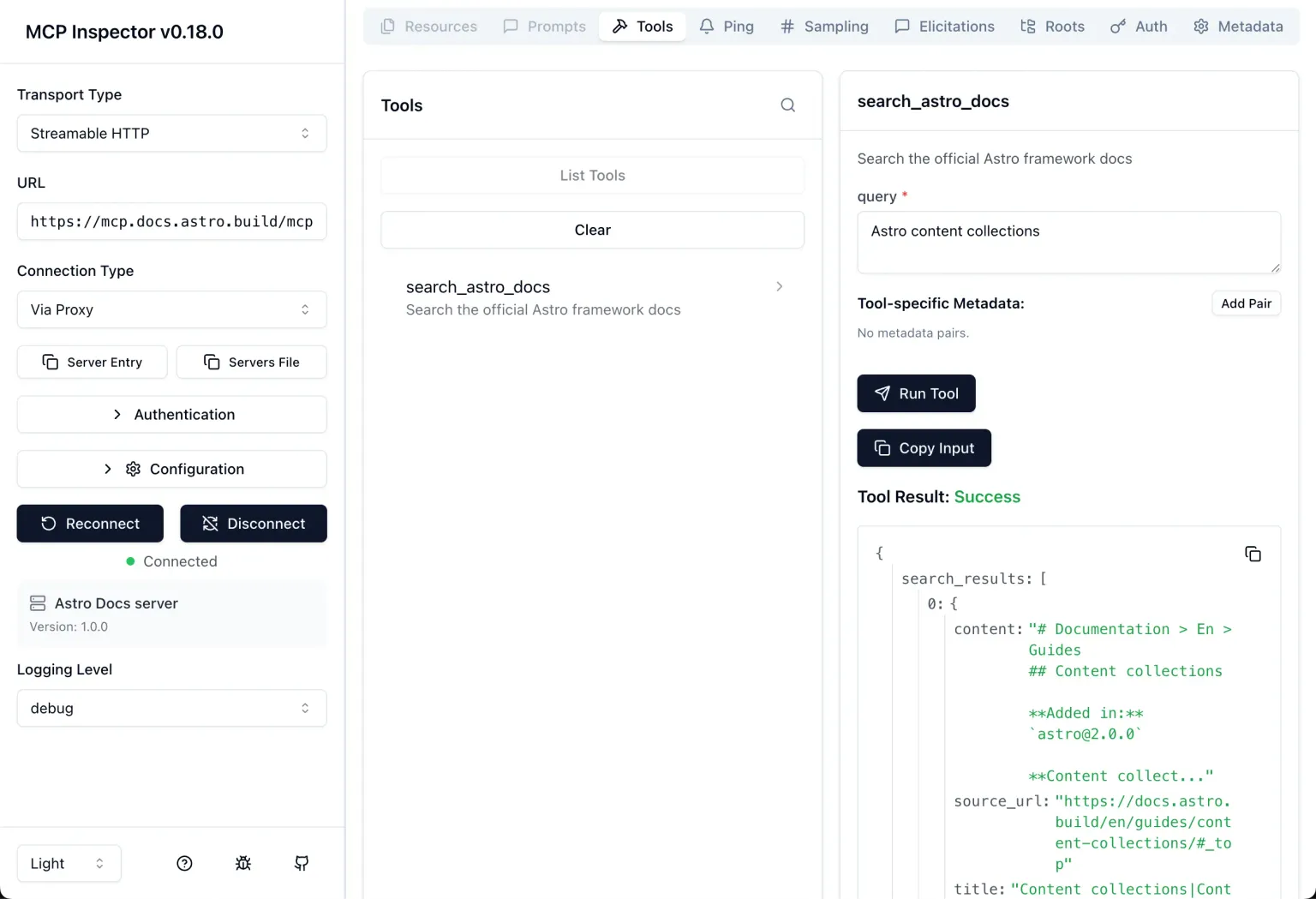
The official MCP inspector is a convenient option to quickly try out the Astro Docs MCP server. You can launch it with the command npx @modelcontextprotocol/inspector, then choose Streamable HTTP as the Transport Type, and enter https://mcp.docs.astro.build/mcp as the URL.
After you click Connect, the inspector will connect to the MCP server and the search_astro_docs tool will appear as an available item under List Tools. Selecting it and providing any Astro-related topic as the query allows you to see the raw documentation data that the AI will receive:
Check out the official docs for more information on the Astro Docs MCP Server.
astro:config
In v5.7.0, Astro added support for importing a subset of the Astro configuration in a type-safe way. The astro:config virtual module provides two submodules, /client and /server, which are designed to be used depending on the runtime environment.
Currently, the following values are available from /client and /server. Note that information related to directory paths is intentionally excluded from /client for security reasons:
/client/server- All of the above
build.clientbuild.serversrcDircacheDiroutDirpublicDirroot
You can use these values to create a variety of utilities. For example, the Astro docs provide an example of a function that appends a trailing slash conditionally, shown below:
import { trailingSlash } from "astro:config/client";
function addForwardSlash(path) {  if (trailingSlash === "always") {    return path.endsWith("/") ? path : path + "/";  } else {    return path;  }}
Check out the official docs to learn more about the astro:config module.
Chrome DevTools Workspaces
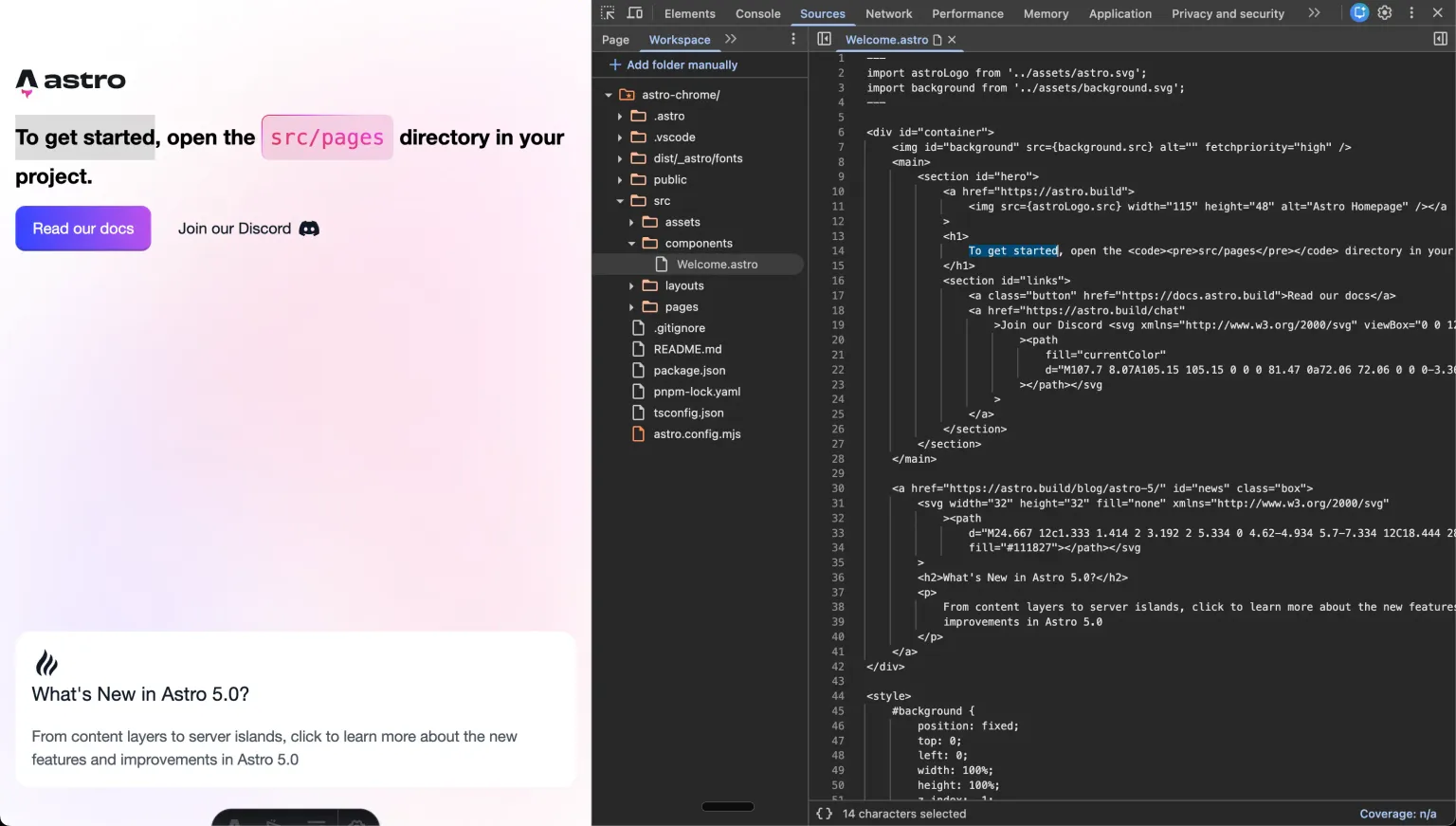
Experimental support for Chrome DevTools workspaces was added in Astro v5.13.0. This allows you to connect your local development environment to Chrome DevTools as a workspace and edit project files directly from DevTools.
To enable this feature, add the experimental.chromeDevtoolsWorkspace flag to your Astro config file:
{ experimental: { chromeDevtoolsWorkspace: true, },}With this enabled, Astro automatically generates the configuration file required for Chrome DevTools workspaces. You can then open your project in Chrome and click Connect in the Sources > Workspaces tab in DevTools. Your project files will then be displayed in DevTools:
Check out the official docs to learn more about Chrome DevTools workspaces integration.
Performance and Stability Improvements
There were not only new features, but also many improvements to existing ones. Some of the highlights, listed below, include options for keeping trailing slash usage consistent and warning about prerendered route collisions. It is nice to see application quality improve without having to make large changes to the codebase.
- Trailing slash redirects
- Faster page rendering
- Remote image optimization in Markdown
- Experimental: preserve order of style and script tags
- Prerendered route collision warnings
- SVG optimization with SVGO
Starlight
Starlight is the official theme for building documentation sites with Astro. Since it was released in 2023, it has been steadily gaining popularity, and in 2025 Starlight powered documentation sites for Cloudflare, Google, Microsoft, Netlify, OpenAI, WPEngine, and countless others.
Starlight itself also continued to evolve throughout the year, seeing seven minor releases with updates including a powerful route data middleware system for implementing custom logic, multi-site search support, automatic heading anchor links, CSS cascade layers, and several accessibility improvements, among many others. Starlight ends 2025 with:
- 50 community plugins, tools, and integrations
- 300 contributors
- 3,300 commits
- 7,600 GitHub stars
- Over 10K active projects
To keep up with all the improvements, and the upcoming v1.0 later this year, be sure to follow the Starlight releases on GitHub.
Other Topics
ViteConf
On October 9 and 10, 2025, ViteConf took place in Amsterdam, the Netherlands. Sarah Rainsberger and Matt Kane from the Astro team spoke about making meaningful contributions to open source projects and shared updates on where Astro is today and what is coming next. If you have not watched the talks yet, definitely check them out:

By the way, below is a photo taken by Evan You, the creator of Vue and Vite, showing Fred Schott and Matt Kane from the Astro team in conversation with Tanner Linsley from TanStack. ViteConf is truly an exciting conference where developers from many different projects come together like this!

Party coders pic.twitter.com/iw66QJg2wl
— Evan You (@evanyou) October 10, 2025
Astro Mart
The official Astro merch shop has been reintroduced as Astro Mart. Both the designs and product lineup have been refreshed, and international shipping is now available. You can also purchase items created by the winners of the Spirit of Astro Design Contest. Be sure to check it out and grab some Astro merch.
Astro Agency Partner Program
In April 2025, Astro launched the Astro Agency Partner Program, designed to connect businesses seeking professional development services with agencies that specialize in Astro. The program includes an agency directory, lead generation support, official certification with partner badges, direct access to resources from the Astro team, and a financial model that supports continued investment in the open source project.
Launch partners included Bejamas, Lucky Media, EXDST, and 58agents with Bits&Letters and Seibert Group joining shortly after. If you are looking for expert help building your next Astro project, be sure to check out the agency partner directory.
Official Sponsors
2025 was a landmark year for Astro’s sustainability, with several companies stepping up as official sponsors.
In September, Mux became the official video partner with a $5,000 monthly sponsorship and released two Astro integrations for video playback and uploading. Webflow announced a $150,000 donation, with their AI code generation tool built entirely on Astro. Cloudflare also contributed $150,000 and became an official partner sponsor. Later in November, Stainless joined as a sponsor partner, launching their Stainless Docs Platform built on Starlight.
Notably, Cloudflare and Netlify collaborated to support open source projects together, demonstrating that even competitors can unite for the benefit of the web. All of these contributions go directly toward long-term maintenance of the Astro open source project.
Built with Astro
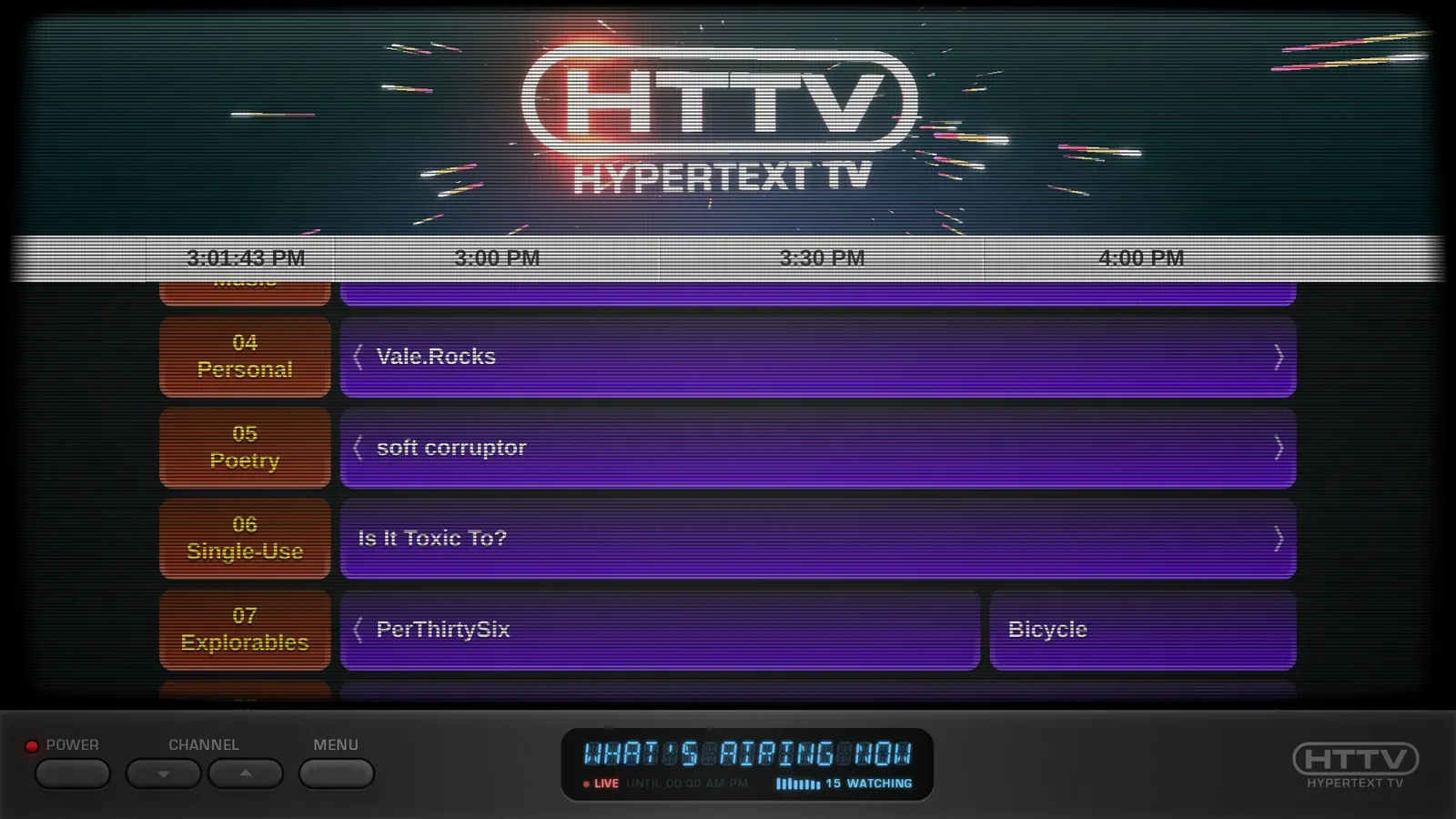
Many websites were built with Astro in 2025, and the sites below are some of my personal favorites. If you find an Astro site you like, go ahead and post about it on social media or in our Discord community’s #showcase channel!
If you have built your own Astro project, you can also submit it to the official Astro showcase and see your work alongside other showcased sites.



Related JavaScript Ecosystem Projects
Biome
Biome, which provides formatter and linter features for multiple languages such as JavaScript, JSON, and CSS, introduced full support for several frameworks including Astro in v2.3. This means formatting and linting for Astro now work out of the box. Once you experience how fast Biome is, it is hard to go back, so if you have not tried it yet, this is a great time to do so!
Oxc
Oxc is a collection of JavaScript tools written in Rust. One of these tools is Oxlint, which reached v1.0 in July 2025 and now supports linting .astro files as well. Currently, linting support is limited to code inside <script> tags, but performance is already impressive and comparable to Biome. Since Oxc also provides a formatter called Oxfmt, it will be interesting to see its future progress toward broader Astro support.
Vite+
There is little doubt that Vite is one of the most important tools in modern web development. Astro runs on top of Vite, and a wide range of frameworks including Nuxt, SvelteKit, and TanStack Start rely on it in their own ecosystems as well. During ViteConf 2025, its creator Evan You presented Vite+, which he calls the unified toolchain for the web. Vite+ is scheduled to reach public preview in early 2026. Although the details have not yet been fully revealed, it is expected to enhance the development experience for many frameworks, including Astro. If this sounds interesting, be sure to request early access on the Vite+ website.
Looking Ahead to 2026 and Astro v6
Astro has a public Project Roadmap where its future development direction is discussed. Here, we will take a brief look at some proposals at Stage 2 or above that are expected to be added to Astro, giving a preview of what is coming in 2026.
Astro v6
While 2025 did not see a major version release, Astro v6 is right around the corner! An alpha version of v6 was first released in December 2025 with support for workerd in dev mode for Cloudflare, an update to Zod 4, the stabilization of many experimental features, and more. (See the v6 branch CHANGELOG.md for complete details.) Most of the v6 scope is already included in the alpha releases, and the first v6 beta release with an accompanying blog post is planned in the very near future!
You can upgrade to the latest available v6 version using our v6 Upgrade Guide which details all breaking changes that might require changes to your existing project code.
Route Caching
Route caching is an API that aims to provide declarative cache control based on web standards in a platform-independent way. The early idea behind this new feature was first teased by Matt Kane in his ViteConf 2025 talk.
Below is a sample taken from the RFC, which shows that you can configure values such as maxAge, swr, and tags on a per-route basis, and invalidate caches by path or tag. It is also designed to support cache invalidation in combination with the cacheHints returned from getLiveEntry() in the Live Content Collections mentioned earlier:
---// src/pages/products/[id].astroimport { getEntry } from 'astro:content';
const product = await getEntry('products', Astro.params.id);
Astro.cache({ lastModified: product.updatedAt, maxAge: 300, // Cache for 5 minutes swr: 3600, // Stale-while-revalidate for 1 hour tags: ['products', `product:${product.id}`]});---<h1>{product.data.name}</h1><p>{product.data.description}</p>// src/pages/api/webhook.tsexport const POST: APIRoute = ({ cache }) => { // Invalidate by path cache.invalidate({ path: "/products/laptop" });
return Response.json({ ok: true });};// src/pages/api/webhook.tsexport const POST: APIRoute = ({ cache }) => { // Invalidate by tag cache.invalidate({ tag: "products" });
return Response.json({ ok: true });};---// src/pages/products/[slug].astroimport { getLiveEntry, render } from 'astro:content';
const { entry, cacheHint } = await getLiveEntry('products', Astro.params.slug);
// Apply cache hints from the live collection loaderAstro.cache(cacheHint);
const { Content } = await render(entry);---<h1>{entry.data.name}</h1><Content />Although this API is not finalized yet, it is great to see how a declarative approach can make configuration shorter and easier to understand compared to manual setup. It is also helpful that different cache invalidation mechanisms across platforms can be unified behind a single API. Once this lands in Astro, more complex caching strategies such as ISR should become much easier to implement.
Tracing Hooks for Astro
This is a proposal to add a low-overhead, general-purpose instrumentation hook system to the Astro core.
Distributed tracing is an effective way to identify application performance bottlenecks, but integrating OpenTelemetry directly into Astro would significantly increase the number of dependencies.
Instead, this proposal introduces a mechanism that allows operations such as page rendering, middleware execution, and component rendering to be measured using before and after hooks. When no listeners are registered, overhead is kept to a minimum, while observability can still be achieved through integrations such as @astrojs/opentelemetry.
This proposal is currently at Stage 2, and if you are interested, you can share feedback by commenting on the proposal or on the related pull request. If you have any thoughts or questions, be sure to check them out.
Closing Thoughts
Whew, that was a long one. Thank you so much for reading through to the end!
Looking back, I hope this article conveyed just how much the Astro ecosystem has matured. Further enhancements to existing features like Content Collections, as well as the introduction of thoughtful APIs for traditionally difficult areas such as responsive images and fonts, feel very much in line with Astro philosophy. Content caching is another area that often causes pain for developers due to its close ties to infrastructure, so I am particularly excited about the APIs aiming to address those challenges.
I cannot wait to see what new features and improvements Astro brings in 2026.